
Classic GitHub: A GitHub client for the Classic Macintosh OS
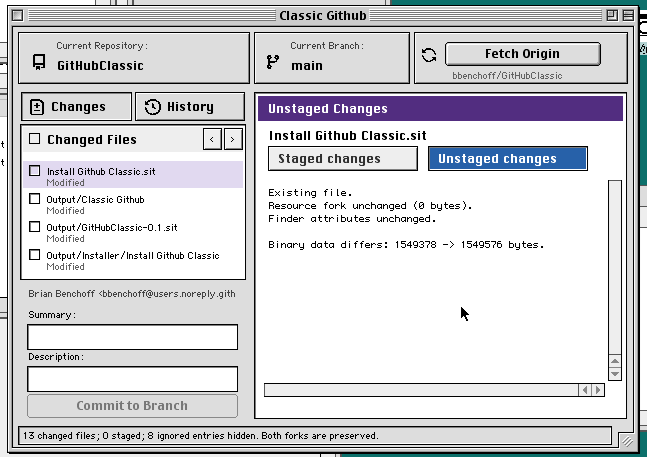
I need to do more performative laptop usage at cafes in San Francisco, and while I have a Powerbook Duo 2300 and a copy of Metrowerks CodeWarrior Pro 4, I don’t have a GitHub client for Classic Mac OS, pre-OS X. So I built one. Here’s some screencaps:
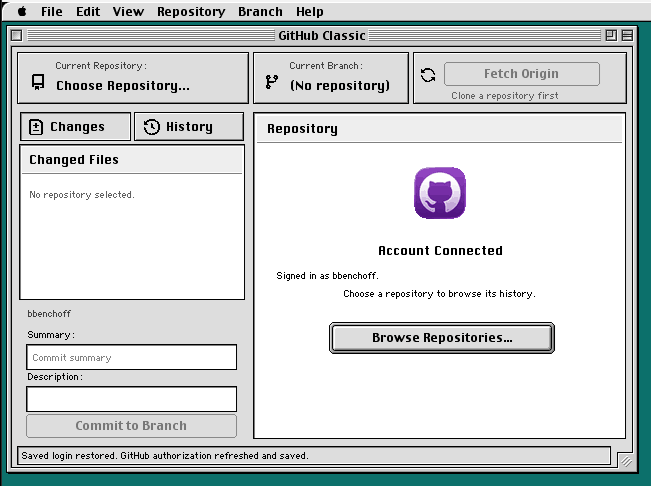
It implements clone, fetch, pull, push, branches, commits, diffs, stashes, merges, and linear rebases without invoking another Git implementation.
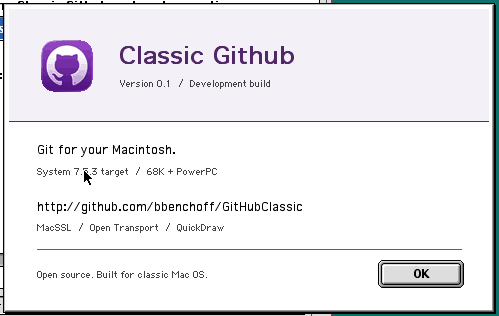
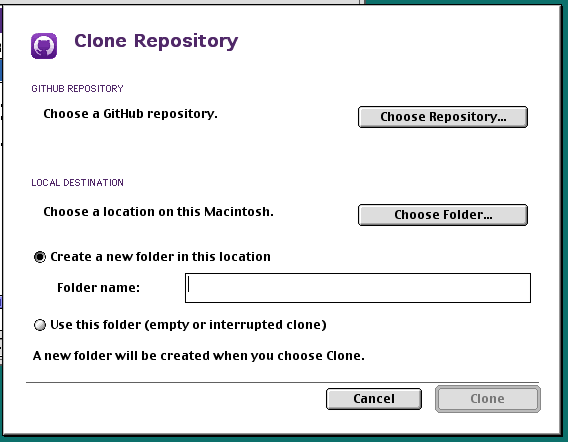
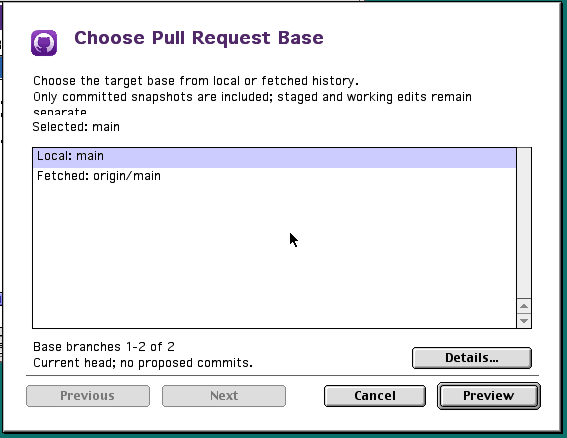
This was developed on a Macintosh using CodeWarrior Pro 4. It was pushed up on GitHub by itself, which is proof enough that this works. There’s a .SIT installer file in the root of the repo. Download that to your old Mac somehow, extract and run the installer, and you have GitHub for a Mac running OS 9.
Two or Three or Five Problems to Solve
Security & SSL
A GitHub client needs to connect to GitHub, and Classic Mac OS comes from an era where the idea of ‘Internet Security’ didn’t really exist. Or the Internet, for that matter. For another project, I ported Mbed-TLS to Mac OS 7/8/9. That project is called MacSSL, and it works well enough to pull data from a server that requires TLS 1.2.
This port relies on Open Transport, the TCP/IP networking stack introduced with Mac OS 7.5.2. With MacSSL, the Mac now performs the TLS 1.2 handshake, validates the certificate chain and hostname, checks certificate dates against the clock, and encrypts the HTTP traffic itself.
Classic Github uses ECDHE-RSA with P-256 and AES-128-GCM, which should be good enough for now, or until GitHub discontinues their use in favor of more advanced ciphers. The RSA cert chains were significantly faster than GitHub’s elliptic curve chain with 68K code. Yes, this is a FAT application with a 68K compatibility, but in testing anything except the fastest Quadras are far too slow to do anything useful. You might be able to get this to work with a clock-chipped SE/30, but GitHub Classic will never work with a Macintosh Plus.
Login
GitHub stopped accepting account passwords for Git operations in 2021, so this isn’t going to be as simple as typing in a username and password. A browser-based login won’t work either. While the machine running GitHub Classic will have network access, Netscape on your Quadra isn’t going to load the modern GitHub login page.
The solution is GitHub’s device authorization flow. The Mac requests a code and displays it in big blue characters. You open github.com/login/device on your phone or a modern computer, enter that code, and approve the application. Your password and any two-factor authentication stay on that device. Meanwhile, the Mac checks with GitHub until approval comes through, receives an access token over its own MacSSL connection, and uses that token to verify which account signed in.
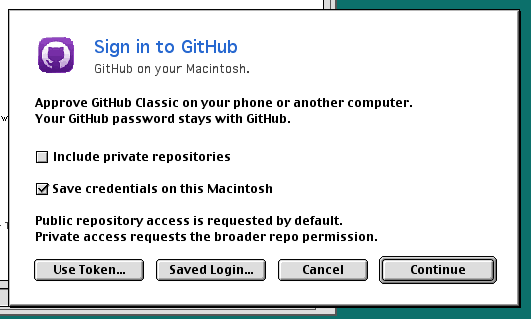
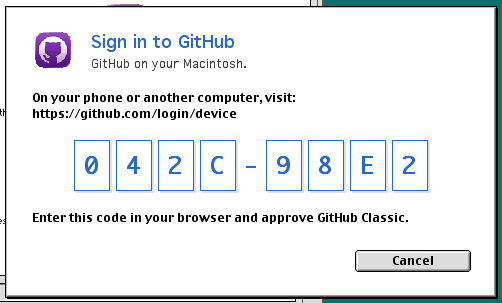
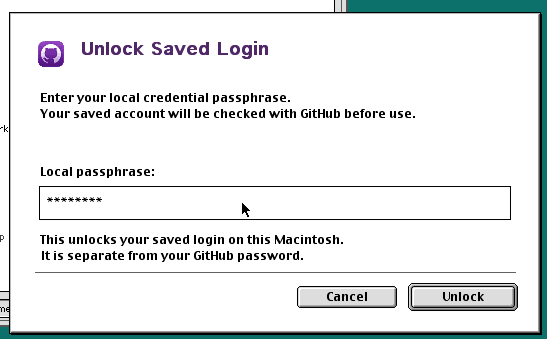
Then there’s remembering the login. Classic Mac OS doesn’t have a modern Keychain (yes, OS 9 had it, but we’re targeting System 7.5.3), and putting a GitHub token in an ordinary preferences file would give anyone who copies that file your authorization.
Classic GitHub instead saves the credentials in an encrypted vault in System Folder:Preferences, protected by a separate local passphrase. The encryption is AES-256-GCM, with the key derived from that passphrase using PBKDF2-HMAC-SHA256 and a random salt. Reading the source tells you how to decrypt the file, but you still need the passphrase. There isn’t a universal password or a decryption key compiled into every copy of the app.
A small background helper keeps the unlock information in RAM so quitting and reopening the client doesn’t mean typing the passphrase again. After restarting the Mac, you unlock the saved login locally instead of repeating the phone approval. Is this secure? Kinda! I’m basically reinventing the wheel here when it comes to persistent secure connections, but you shouldn’t consider this secure secure. It’s kinda secure.
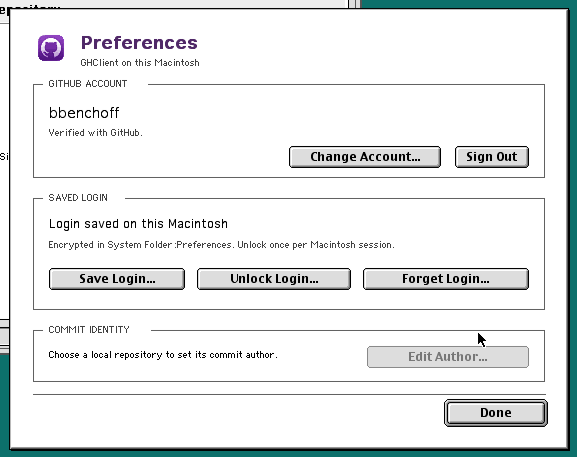
It should be noted that anyone who uses Classic GitHub basically gives away the keys to their castle. By giving this random app some weirdo made their GitHub authorization to all their repositories, I could, in theory, read everything. This would involve putting code in the app to send the keys back to the server, or something. But I’m not doing that, and you can verify that by looking at the source.
What the fuck is a file in Classic Mac OS?
Here’s a fun story: I had a job once where the entire engineering department used (new) Macs, and the techs had crappy Windows Dells. The techs couldn’t use a critical repo. Every time a Windows user tried to clone it, the clone failed. No one could figure out why. In the entire company, I was the only one to figure out what the hell was going on.
The reason this company’s E4 mafia couldn’t do anything with this repo was simple: a single file, several folders deep, named con. Windows has a list of banned file names, among them LPT1, COM3, NUL, AUX, and a file named con. Remove or rename this file and Windows users could finally get work done.
On the Classic Mac OS, there are some other limitations: filenames are capped at 31 bytes, a colon separates components of a path, and importantly a slash (either / or \) can be part of the file name. These are all problems this implementation of Git needs to solve. Cryptography and security? Those are fine, but making GitHub work with a file system designed forty years ago is another matter.
HFS versus Every Other Filesystem
The HFS used by classic Macs (and later the HFS+ file system, released with Mac OS 8.1) is fuckin weird compared to anything contemporary. Files are split into data and resource forks, meaning each “file” contains a data fork (the actual text in a text file, or pixels for a picture) and a resource fork (icons, menu definitions, etc). Either fork can be empty.
For most applications this doesn’t matter; a .GIF file will usually contain only a data fork, with the normal data to reconstruct the .GIF file. A .TXT file is only a data fork that contains only text, just like it does in Windows or Linux, differences in CR and LF notwithstanding.
Other files, especially traditional 68K applications, put almost everything in the resource fork. Icons, menus, dialogs, strings, and executable code may live there. If you copy only the data fork – which is what happens when a Macintosh file passes through a tool or filesystem that understands only ordinary byte streams – you can lose almost everything. This is why Mac files are commonly transferred using MacBinary, BinHex, or AppleDouble: these transport formats keep the data and resource forks together.
Solving the Resource Fork problem in Git
So, how do you write a GitHub client that works with these data and resource forks? There are a few ways:
- Just ignore the resource fork. That’s actually not as bad as it sounds. The Mac will pull down text files and images from GitHub, and you can also push those files up. This plan falls apart when you want to commit Mac applications, a ResEdit document, or anything that depends on Macintosh resources.
- Copy every Mac file with resources into a MacBinary file before committing it. This preserves everything, but everything is saved as a binary blob. A Linux user can no longer open
Hello.cin a text editor, and GitHub can’t make a usable diff. - Use AppleDouble. This leaves the data fork under its normal file name and stores the resource fork and Finder metadata in a companion file, like
Hello.cand._Hello.c. This is a real technique used by some tools, but fills the repo with trash; there’s a copy of every file with._appended to it. - Use Netatalk. A Linux server running Netatalk can expose a directory to the old Mac over AFP and transparently store its resource forks in AppleDouble files. This is clean, but it’s not a Git client; Git would still run on the Linux server. The Mac would still be editing a network share, at which point we’re asking ourselves, “why don’t we just use an FTP server?”.
The answer to this problem is to use a contained version of AppleDouble. The data fork is committed under its real name, while the resource fork and Finder metadata are stored in a reserved .ghclient-mac directory:
Hello.c
.ghclient-mac/
├── version
└── forks/
    └── 6f/
        └── 4d9a.../
            └── ...
Hello.c remains a completely ordinary Git blob. Anyone on Linux or Windows can open, edit, diff, and commit it normally. The file under .ghclient-mac contains the exact resource fork bytes and the Finder metadata.
When Classic GitHub stages a file, it reads the data fork, resource fork, and Finder metadata. All three enter the Git index together. A change made only to the resource fork is therefore a real Git change, even when the data fork is identical. Checkout reverses the process: Classic GitHub creates the HFS file, writes both forks, and restores its Finder metadata.
This still pollutes the repository with a .ghclient-mac directory. There’s no way around that while still using Git objects and guaranteeing every normal clone receives the complete Macintosh files. The compromise here is to contain all the weirdness to one single directory instead of littering a repo with ._whatever files. It’s not the best solution, but I don’t see anyone else building a GitHub client for Classic Mac OS, so here we are.
The end result is that a Classic Mac – a Pismo, or a toilet seat iBook, running OS 9 – can pull down a repo, make changes, commit, and push. No one’s the wiser. You’re just editing a text file. Additionally, someone on a ThinkPad can pull down a Macintosh CodeWarrior project and make changes to the individual files (they’re just .c files), push it back up, and eventually those changes will appear on whatever Mac is running CodeWarrior. If you want to edit Mac resource files, you’ll need a Mac, but who cares, that was always going to be a problem. Now you can use Git to solve that problem.
This technique has the additional feature of allowing me to see who on GitHub is actually using this client: just search for .ghclient-mac folders. So that’ll be neat in a decade.
Implementing Git
Everything above is the prerequisite to building a GitHub client for the Classic Mac OS. The ‘draw the rest of the owl’ is building Git for the Classic Mac OS. There is no command line. Everything has to be done the hard way. There’s no curl.
In Git, a file becomes a blob; directories become tree objects; a commit points at a tree and its parent commit; and each object is named by its SHA-1 hash. GitHub Classic writes those objects and a real Git index directly into the repository’s .git directory. There is no translation step and no GitHub Classic server sitting in the middle.
To clone or fetch, the Mac asks GitHub for its advertised references, sends want and have lines using Git’s packet-line format, receives a packfile, expands its zlib streams, resolves OFS_DELTA and REF_DELTA objects, verifies the pack checksum, and writes the resulting objects to disk. Push runs the process in reverse: GitHub Classic walks the reachable commit graph, builds a packfile, sends it to git-receive-pack, and updates the remote-tracking reference only after GitHub returns a valid acceptance report.
The diff viewer is also local. I started by looking at Amend, Joshua Stein’s self-contained revision control system for System 6, and its BSD-derived diff code. GitHub Classic ultimately uses its own Myers diff, understands classic Mac CR line endings as well as Unix LF and Windows CRLF, and reports resource-fork and Finder-information changes alongside changes to the data fork. Pathological inputs fall back to a coarse replacement instead of consuming every byte of RAM in the machine. The result is drawn with QuickDraw using native controls, Chicago, Geneva, and Monaco, with a layout that still fits a 640×480 display and doesn’t depend on color to distinguish additions from deletions.
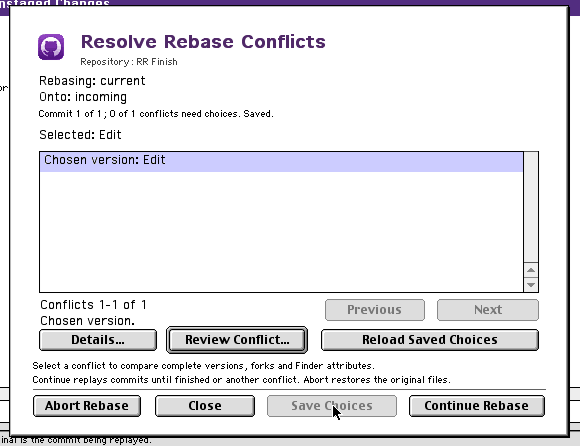
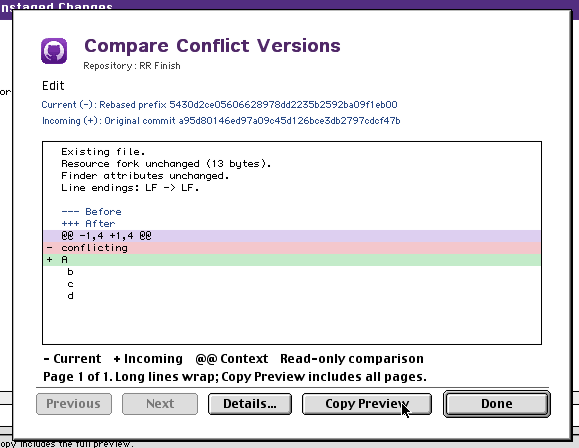
Everything happens inside the cooperative Macintosh event loop. TLS handshakes, pack expansion, hashing, checkout, and graph traversal periodically return control so the window can redraw and the user can cancel the operation. On a modern system that sounds like basic housekeeping; on Classic Mac OS, forgetting to do it means the entire computer appears to freeze while your application thinks about a delta.
The final application is compiled twice, once for 68K and once for PowerPC, and combined into a FAT application. Excluding MacSSL the repository contains about 38,000 lines of C and headers for the client itself. Everything promised at the top of this page – the clones, the stashes, the rebases – happens in that C, without invoking another Git implementation and without a proxy server somewhere doing the real work.
The repository on GitHub is also a demonstration of the resource-fork scheme described above. The C files are ordinary blobs that can be edited anywhere, while the CodeWarrior project, interface resources, login helper, and built Macintosh applications have their resource forks stored under .ghclient-mac. Clone that repository with GitHub Classic and it reconstructs its own build environment on the Mac. The Git client can, in a limited but very real sense, check out and build itself.
The Installer
Putting a bunch of files into a repo and allowing people to download it works, but, because I’m distributing the Classic GitHub application through GitHub, it’s utterly unusable. My implementation of Git is the only one that works with Classic Mac applications (see the resource deal thing above), so short of having each user compile the app themselves, there’s no way for anyone else to run it.
This is fuckin hilarious and I should have left it at that.
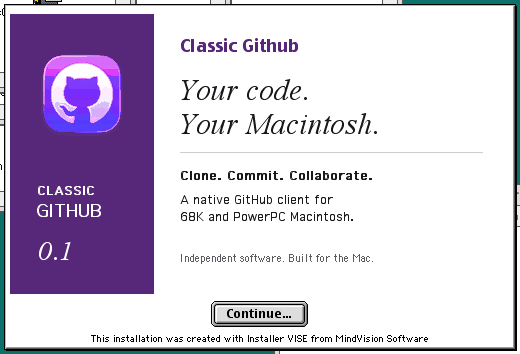
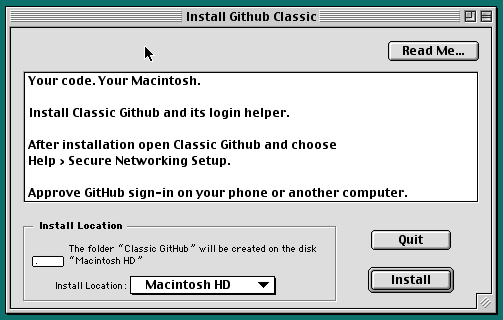
But the traditional way of Mac app distribution is to take the executable and related files, pack everything up with Installer VISE, pack that installer as a .SIT file, and throw it on the Internet. It’s the least I can do, so that’s what I did. Here’s some pics of the installer:
Get it and use it
Everything is up on GitHub, with the .SIT installer in the root of the repo.
As for me, this works. Not that I’d ever do performative laptop usage in Corgi Cafe. Those people are weird.